
Your athletes, your observations, one next step.
Keep your coach diary next to each athlete’s own entries — and write once for the whole group when you train or race together.
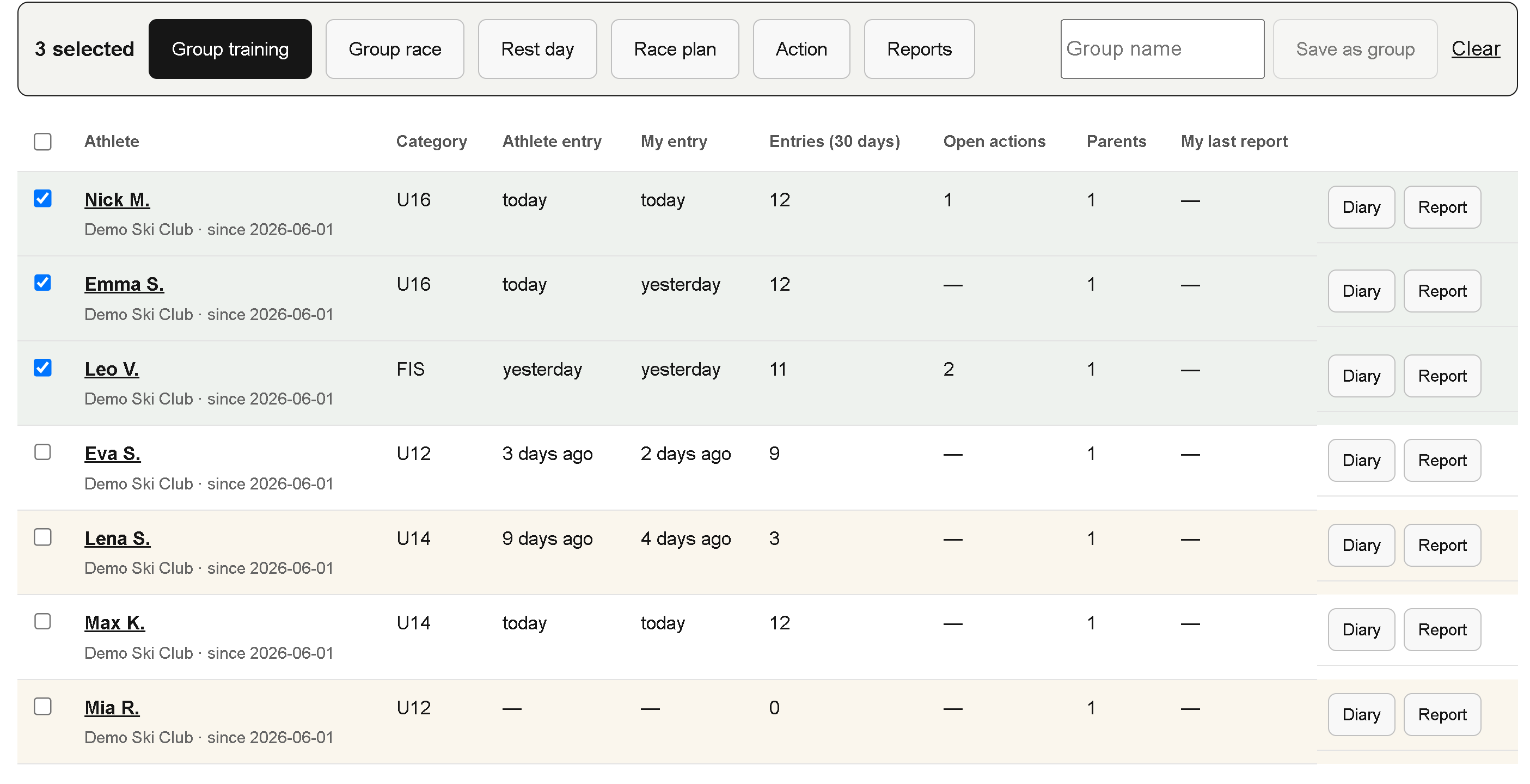
One entry for the whole group
All your athletes in one list. Select several — or a saved group — and enter a group training, a race or a rest day in three steps:
- The session, once — place, discipline, duration, runs, snow and weather.
- Pick, then tap the athletes — choose today’s focus, your feedback, the errors you saw, what went well and the next focus from a list (or type your own), and tap the athletes each one applies to.
- A quick 1–5 rating per athlete, with “can’t assess” when you did not see it.
Each athlete gets their own separate entry and never sees the others.
From the same list you can assign a race, propose the same action, issue reports or invite several athletes at once.
Your day and your week
Plan the week once for a group — training, race or rest, discipline, minutes and focus — and each athlete finds it in their diary, already filled in. Each morning you see who wrote, who slept badly or feels low, and whose training load jumps. If you wish, DOME5 reminds athletes without an entry by email and sends you a short summary on Sunday evening.
The same words as your athletes
Errors are ticked from one list, grouped by discipline — for example “late pressure on the outside ski” or “late edge change” for all disciplines, and slalom, giant slalom and speed-specific ones. Athletes tick from the same list in their own diary, so you both name things the same way. Reports and the season closing show what you both noticed, what only you saw, and what the athlete is already aware of.
Your coach diary
Most questions are answered on a 1–5 scale, with “can’t assess” when you did not see it. Your focus, your feedback and the next focus can be picked from a list or written in a few words. The athlete’s entry for the same session sits next to yours.
Races
Find a race in the official FIS calendar, add it with its link and assign it to several athletes. On race day the race is already in their diary, and the FIS link takes everyone to start lists and results.
Review, act, follow up
- Review. Your entry and the athlete’s entry for the same day sit side by side, and patterns across entries become visible.
- Agreed action. Propose one concrete change. The athlete — or, for children up to U14, their guardian — approves it.
- Follow-up. Record the outcome on the agreed date; it appears in your reports.
Reports and the season closing
Close the last month, six months or year with one tap — for one athlete or a whole group — or choose any monthly, quarterly, six-month or annual period. Each report opens with a colour summary: what went well, what to improve and the targets for the next period; your own recommendation is optional. Each report uses the athlete’s entries and your own records only; parents receive a version without diary entries. Reports show the errors you noted most often and how they compare with what the athlete noticed. At the end of the season (1 June – 31 May) you get a season closing with the numbers, recurring errors and the points to watch next season. See what a report looks like.
Readings from the athlete’s watch
When an athlete shares them with you, you see sleep, HRV, heart rate and workouts next to the diary and in your reports. Athletes enter readings by hand from any device; automatic import from WHOOP, Garmin, Polar and Suunto is being activated.
Access and privacy
- Your account starts once the administrator approves it. You invite athletes and parents with one-time links that you send yourself; for athletes under 14 a parent or guardian agrees first.
- You see only athletes who accepted your invitation — their earlier history only with their permission — and never other coaches’ notes.
- When a connection ends, your access ends. A report about your coaching period needs the athlete’s or guardian’s approval.
- A club name is only a label and gives nobody access.
Coaches use DOME5 free.
The planned subscription belongs to the athlete; payments are not active yet. See pricing.
Request coach accessThe administrator reviews each request and emails you when your access is ready. Requesting access does not start a payment.